Version 8.0
To make it easier for you to book teaching spaces, we’ve added a link to the Venue booking system to the Timetabling tile for Australian staff.
Wednesday, 9 May 2018

Monday, 7 May 2018
Changes to news feeds
Version 8.0
We’ve made some changes to the way we feed news into my.monash. This is to reduce the number of clicks it takes to get to a news item.
Student news is now its own tile. Open to find out about opportunities, programs and student interest stories.
Staff news is now delivered through the Monash Lens tile. Link directly to commentary by leading academics and researchers on global events, news and pioneering research.
Calendar feeds link has moved to the subscription section of the dashboard. Follow the link to import your timetable and other Monash events into your Google calendar.
We’ve made some changes to the way we feed news into my.monash. This is to reduce the number of clicks it takes to get to a news item.
Student news is now its own tile. Open to find out about opportunities, programs and student interest stories.
Staff news is now delivered through the Monash Lens tile. Link directly to commentary by leading academics and researchers on global events, news and pioneering research.
Calendar feeds link has moved to the subscription section of the dashboard. Follow the link to import your timetable and other Monash events into your Google calendar.
Tuesday, 1 May 2018
Customisation is here!
Version 8.0
We’re excited to announce that customisation is now available in my.monash.
This new feature allows you to customise your my.monash home screen by moving, hiding or un-hiding tiles. We’ve enabled customisation on the desktop and mobile app to make your interactions faster, simpler and more relevant.
It’s possible to customise the app on each of your devices separately. This means you could choose to show more tiles on your desktop and fewer on your mobile device.
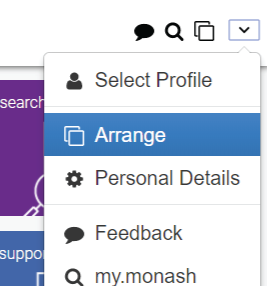
To get started, find the new ‘Arrange’ icon. Usually in the top right or bottom menu of your screen. See images below.
Once activated, you can move Mandatory tiles to your preferred position and hide/unhide Optional tiles customising your my.monash experience.
It’s easy to differentiate between Mandatory and Optional tiles. Optional tiles have a cross icon (in grid view) or check box (in list view) allowing you to ‘turn them on or off’. You can’t remove Mandatory tiles so they don’t have a cross icon (in grid view) and instead, have a lock icon in list view.
Customisation changes on your mobile app may be lost if you logout. Make sure you visit the app regularly to keep your settings.
Need help? Watch this video for a demo on how to arrange, remove and re-add tiles.


We’re excited to announce that customisation is now available in my.monash.
This new feature allows you to customise your my.monash home screen by moving, hiding or un-hiding tiles. We’ve enabled customisation on the desktop and mobile app to make your interactions faster, simpler and more relevant.
It’s possible to customise the app on each of your devices separately. This means you could choose to show more tiles on your desktop and fewer on your mobile device.
To get started, find the new ‘Arrange’ icon. Usually in the top right or bottom menu of your screen. See images below.
Once activated, you can move Mandatory tiles to your preferred position and hide/unhide Optional tiles customising your my.monash experience.
It’s easy to differentiate between Mandatory and Optional tiles. Optional tiles have a cross icon (in grid view) or check box (in list view) allowing you to ‘turn them on or off’. You can’t remove Mandatory tiles so they don’t have a cross icon (in grid view) and instead, have a lock icon in list view.
Customisation changes on your mobile app may be lost if you logout. Make sure you visit the app regularly to keep your settings.
Need help? Watch this video for a demo on how to arrange, remove and re-add tiles.
Arrange Icon in browser menu:
Arrange Icon in browser menu:
Arrange Icon in iPhone menu:
Arrange Icon in Android menu:
Thursday, 15 March 2018
Some improvements and enhancements
Version 8.0
We've been tinkering under the hood over the last few weeks to improve the way my.monash works. It won't look much different but you should experience:
To avoid any inconsistencies and enjoy all the new features on the mobile App, please go to your App store and update then logout and log back in. See help with logging in and out.
We've been tinkering under the hood over the last few weeks to improve the way my.monash works. It won't look much different but you should experience:
- Fewer login issues - this means you won't have to keep logging in (we know you've found this frustrating)
- Improved stability - so you shouldn't lose access to your tiles
To avoid any inconsistencies and enjoy all the new features on the mobile App, please go to your App store and update then logout and log back in. See help with logging in and out.
Thursday, 11 January 2018
Newsletter subscriptions in the dashboard
Release 7.0
We’ve added a new element to the student and staff dashboard.
Now, not only can you add and save your favourite links in the dashboard, you’ll be able to access subscription pages to some popular newsletters.
If you have a newsletter that’s relevant to a broad Monash audience, let us know via the feedback link in my.monash and we’ll consider it for inclusion here.
We’ve added a new element to the student and staff dashboard.
Now, not only can you add and save your favourite links in the dashboard, you’ll be able to access subscription pages to some popular newsletters.
If you have a newsletter that’s relevant to a broad Monash audience, let us know via the feedback link in my.monash and we’ll consider it for inclusion here.
Wednesday, 8 November 2017
New in the dashboard for students
Release 7.0
We've added a new feed to the To do section of the dashboard for students.
If you have an encumbrance (block on your account) for an outstanding fee or incomplete form, you'll see a message. Follow the link for instructions on how to clear it.
We've added a new feed to the To do section of the dashboard for students.
If you have an encumbrance (block on your account) for an outstanding fee or incomplete form, you'll see a message. Follow the link for instructions on how to clear it.
Wednesday, 4 October 2017
Final-year student tile
Release 7.0
We’ve just released a new tile for our ‘Final year students’.
You’ll see this tile if you’re an undergraduate student on an Australian campus (excludes Monash College) and you’re due to complete your course in this January to December period.
We’ll use this tile to communicate with you about activities you should undertake in your final year. We’ll include information about graduations, job ready activities, leadership and volunteering opportunities etc.
We’ve just released a new tile for our ‘Final year students’.
You’ll see this tile if you’re an undergraduate student on an Australian campus (excludes Monash College) and you’re due to complete your course in this January to December period.
We’ll use this tile to communicate with you about activities you should undertake in your final year. We’ll include information about graduations, job ready activities, leadership and volunteering opportunities etc.
Subscribe to:
Posts (Atom)